
How paid indicators are sold on TradingView
TradingView lets authors publish scripts in three ways:
- Open-source. Anyone can add the script and read its code.
- Protected. Anyone can add the script, but the code is hidden.
- Invite-only. The code is hidden and only accounts the author has granted can add it to a chart.
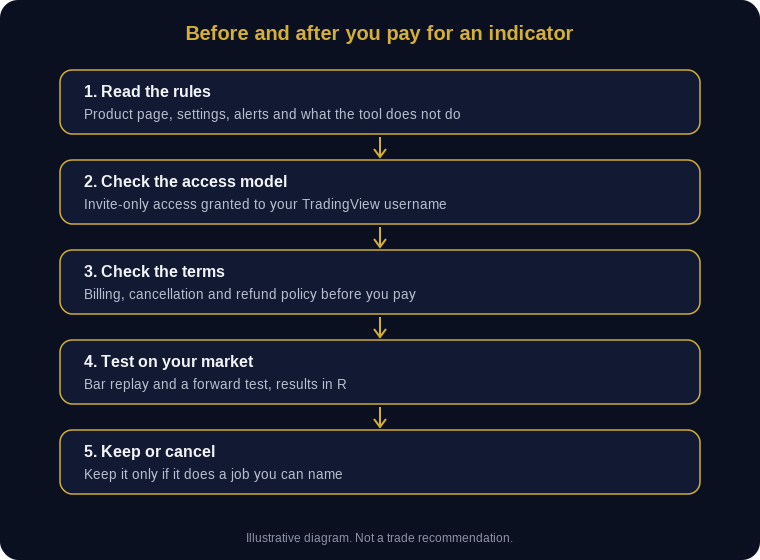
Paid indicators almost always use the invite-only model. TradingView does not sell them or take payment for them: you pay the author or their company through their own checkout, and the author then adds your exact TradingView username to the script’s access list. Authors who sell invite-only scripts have to follow TradingView’s House Rules and its requirements for script vendors, which you can read on TradingView. Those rules govern how scripts are published and described; they are not an endorsement of any author or a check on results.
After access is granted, the script appears under the Invite-only section of the Indicators dialog. Step-by-step instructions, and fixes if it does not appear, are in how to access invite-only scripts on TradingView.
Do you need a paid TradingView plan?
A paid indicator subscription is separate from your TradingView plan. Your plan still decides practical limits such as how many indicators you can have on one chart, how many alerts you can keep active, and which features (for example Pine Screener or certain chart types) are available. Check those limits on TradingView’s plan page before buying an indicator that depends on them, such as a scanner built for Pine Screener.
What you are actually paying for
- Logic you could not easily write. Multi-timeframe reads on completed candles, scoring, structure detection or scanner-ready outputs take real Pine Script work.
- Convenience. One tool doing what would otherwise take four indicators and a notebook.
- Alerts that match the chart. Being notified of the same events you see drawn, without watching the screen.
- Documentation, updates and support. A written explanation of each setting, fixes when TradingView changes something, and someone who answers questions.
What no price can buy: certainty about outcomes. An indicator describes price. Markets change, and any method can go through long losing runs.
Try free tools first
Built-in TradingView indicators and drawing tools are enough to practice almost every method in our free strategy guides, and TradingView’s community script library contains many open-source tools you can read line by line. A paid tool makes sense when you know the job you want done and the free route is slow, cluttered or not possible. Our best free TradingView indicators guide covers the free options.
Red flags before you pay
- Performance promises. Profit figures, “no losing trades,” a percentage of correct calls, or “accurate” as a selling point.
- Only screenshots of winners, with no explanation of what the tool does when it is wrong.
- No description of confirmation. If you cannot tell whether markers wait for the candle to close, assume they may repaint.
- No written terms. No visible billing, cancellation or refund policy.
- Pressure tactics. Countdown timers on “last spots,” private-message-only sales, or requests for your TradingView password. Access only ever needs your username.
- Copy-trading dressed as an indicator. If the product is really a feed of someone’s trades, it is a different product with different risks.
A checklist for judging any paid indicator
- Can you name the job? Trend, momentum, location, bias, scanning or a specific setup. If the description is “it tells you when to buy and sell,” keep looking.
- Are the rules described? You do not need the code, but you need the inputs, the conditions and the defaults.
- Does it read completed candles, including completed higher-timeframe candles?
- What does it not do? Good product pages say so.
- Is it written for your market? A gold-only system is not a crypto tool; a 15-minute tool is not a swing tool.
- Are the alerts listed? How many, and what each one means.
- What are the terms? Monthly, annual or one-time; how to cancel; refund policy.
- Can you test it? Plan a bar-replay and forward test, measured in R, before you rely on it. Our buy/sell indicator guide shows how.
Questions to ask the author before you buy
A good vendor will answer these plainly, usually from the product page or documentation:
- Which markets and timeframes was it written for? And which has it not been checked on? A tool built and checked on one feed may behave differently on another broker’s data.
- What happens on the candle that is still forming? Does anything appear, move or disappear before the close?
- Which alerts exist, and when do they fire? “Once per bar close” and “once per bar” behave differently.
- How are updates delivered? Invite-only scripts update in place for everyone with access, so a change in logic reaches your chart without a reinstall. Ask how changes are announced.
- What happens to access if you cancel? Usually the username is removed at the end of the paid period.
- Who answers support questions, and how? An email address and a written FAQ are a good sign.
If the answers are vague, or every answer turns back to results, treat that as information about the product.
Thinking about price
Compare the cost with what you would otherwise spend in time, and with your account size. A subscription that costs a large share of a small account each year changes the arithmetic of trading it. One-time licenses avoid renewals but may not include future tools. Bundles make sense only if you would use most of what is inside. None of this is about whether a tool “pays for itself”; it is about whether it does a job you can name, at a cost that fits your budget.
After you buy
- Double-check the TradingView username you gave; most access problems are a typo or a different account.
- Add the script from the Invite-only tab, save it to favorites, and set up a clean chart layout for it.
- Read every setting once with defaults on, then test before changing anything.
- Set alerts only for events you will act on, and use “once per bar close” where the tool recommends it.
- Keep a journal for the first weeks. If you cannot name what the tool improved, cancel.
How Apex Edge sells its indicators
Apex Edge indicators are invite-only scripts for TradingView. Checkout is processed by Whop, and access is granted to the TradingView username you provide. Each product page lists what the tool draws, its alerts, its main settings and, where relevant, what it does not do. Billing options and toolkits are on the pricing page, and terms are in the refund policy and terms of use. We do not publish performance claims, and no tool is described as accurate or profitable. Gold tools such as Apex Edge Gold Trend Cross are gold-only and carry the note: Tested on IC Markets XAUUSD data only. Session timing for gold is covered in the best time to trade gold.
Examples by job: Apex Edge Trend Pullback for trend and pullback status, Apex Edge Zone Map for support and resistance areas, Apex Edge Smart MACD for momentum with 4-hour volatility context, and the Apex Edge Intraday Scanner for Pine Screener shortlists. If you want to try something free first, the Trend Check Dashboard is a multi-timeframe bias table; you can claim it free with your email.
Worked example (illustrative)
You trade forex on the 1-hour chart and keep missing pullbacks because you check four timeframes by hand. You write the job down: “show me trend agreement across timeframes and flag pullbacks into the 20/50 EMA band on closed candles.” You first try a free bias table and built-in EMAs for two weeks. That helps, but you still miss the pullbacks. You shortlist two paid tools whose pages describe that exact job, read both refund policies, and choose the one that documents closed-candle confirmation and lists its alerts. For the first month you journal every alert in Sydney time and the decision you made. At the end, you can say whether it saved time and whether your plans got cleaner. That is the test, and it applies to any vendor. The scenario is invented to show the process.
Frequently asked questions
How do paid TradingView indicators work?
Most are invite-only scripts. You pay the author through their own checkout, and the author grants access to your TradingView username. The script then appears in the Invite-only section of the Indicators dialog.
Does TradingView sell indicators?
No. TradingView hosts scripts and sets publishing rules, but paid indicators are sold by independent authors. TradingView does not take payment for them or endorse them.
What is an invite-only script?
A published script whose code is hidden and which only accounts granted by the author can add to a chart. Our guide to accessing invite-only scripts covers the steps and common fixes.
Are paid indicators better than free ones?
Not automatically. A paid tool can save time or do something hard to build, but built-in and open-source indicators are enough for many methods. Judge any tool by the job it does and your own test.
Do I need a paid TradingView plan to use a paid indicator?
The indicator subscription is separate from your TradingView plan. Your plan still sets limits such as indicators per chart, active alerts and access to features like Pine Screener, so check those before buying.
How are Apex Edge indicators delivered?
As invite-only TradingView scripts. Checkout is processed by Whop, and access is granted to the TradingView username you provide. The Trend Check Dashboard is free; you claim it free with your email.
Keep reading
How to access invite-only scripts
Find your username, request access, and fix a script that is not showing.
Best free TradingView indicators
Built-in and free tools to try first.
Buy/sell indicators on TradingView
How to test any indicator before you rely on it.
Pine Screener with invite-only indicators
Scanning a paid script across a watchlist.
Choose indicators without clutter
One tool per job.
Best TradingView indicators
A type-by-type comparison, not a ranked list.
Also see the free strategy library (no sign-up), or browse guides by topic. Questions? Email contact@brainiosoftware.com.
General information only. This guide is general education, not personal financial product advice or a recommendation to buy or sell anything. Indicator readings, alerts and screener results are not trade recommendations. Examples use illustrative numbers. TradingView is a third-party platform; we are not affiliated with or endorsed by TradingView. Education only. Not financial advice. Trading involves risk of loss. Read the full risk disclaimer.